Qontent by QOMO
InfoComm 2026: QOMO Showcases New Product Launches, Software Partnership, and AV Innovation in Las Vegas
Wixom, MI — QOMO returned from InfoComm 2026 with new product launches and a continued focus on innovative technology that simplifies collaboration, teaching, and presenting across classrooms and meeting spaces.
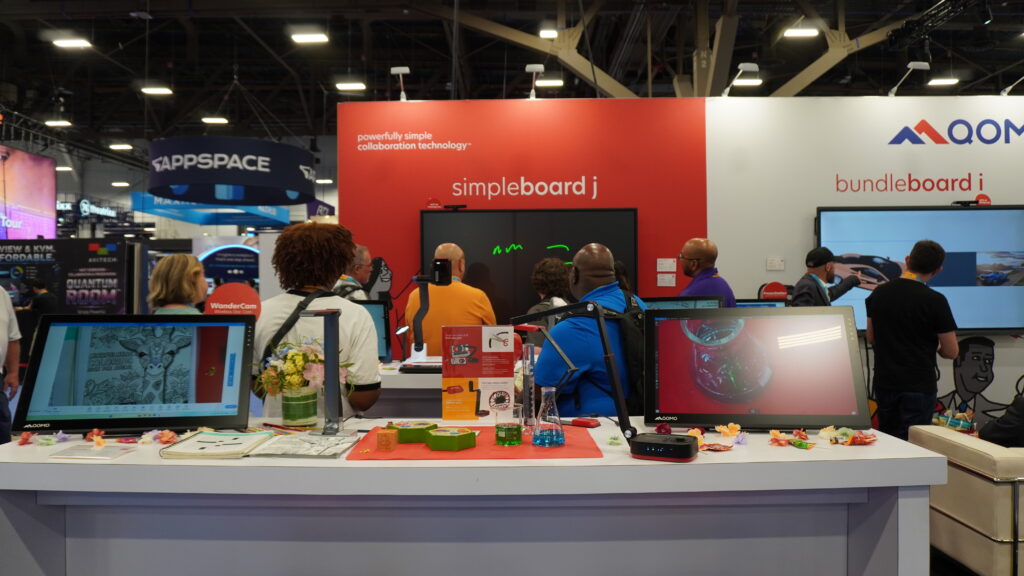
This year’s showcase featured the launch of new products SimpleBoard J Interactive Display, WanderBoard 32 Mobile Display, and QShare 110 Wireless Sharing. QOMO also debuted new enhancements to the BundleBoard i Interactive Display, along with demonstrations of popular products PresenStation 800F1 Interactive Monitor and QOMO’s Document Cameras.
Building on its hardware innovations, QOMO expanded its software ecosystem through a new partnership with Mago, delivering a more complete and unified meeting room experience on QOMO interactive displays.
SimpleBoard J Interactive Display
The SimpleBoard J Interactive Display is designed for organizations that want interactive functionality without the complexity of a built-in operating system.
Unlike traditional displays, it does not include an onboard OS, making it easier for IT teams to manage functionality and security. Instead, it works with a slot in computer or connected device, giving organizations more control over their AV environment.
The SimpleBoard J focuses on essential tools like annotation, digital whiteboard, and touch interaction, while reducing maintenance demands.
Video Feature:
Mago Software Partnership
At InfoComm 2026 QOMO introduced it’s partnership with Mago, a unified meeting room software platform demonstrated on the SimpleBoard J.
Mago is designed to bring together the core elements of modern meeting spaces into a single, streamlined user experience. It supports content sharing, collaboration, and meeting workflows in a way that helps teams connect and work more efficiently, whether in education, enterprise, healthcare, or government environments. By centralizing these capabilities, Mago helps reduce the need for multiple disconnected tools and simplifies how users interact with technology in the room.
When combined with QOMO’s slot-in computer, SimpleBoard j, and ConferenceCam 006, the setup creates a seamless and powerful video conferencing hub.
Press Release: Mago Showcases Unified Meeting Room Software at QOMO Booth at InfoComm 2026
WanderBoard 32 Mobile Display
The WanderBoard 32 Mobile Display is a compact, movable solution designed for flexible workspaces and small-group collaboration.
Its 32-inch size and mobility make it ideal for huddle spaces, breakout rooms, and classrooms where technology needs to move with the user. It supports both vertical and horizontal use for added versatility.
Video Feature:
QShare 110 Wireless Sharing
The QShare 110 Wireless Sharing solution enables quick, simple plug-&-play lag-free content sharing without disrupting meetings or lessons.
Designed for classrooms and meeting rooms, it supports 4K wireless sharing via HDMI or USB‑C, allowing users to connect and present from personal devices with minimal setup. The QShare 110 connects without Wi-Fi setup or software installation, making for a secure connection while keeping the focus on communication.
Video Feature:
BundleBoard i Interactive Display — Product Enhancements
The BundleBoard i Interactive Display continues to deliver a powerful, Google EDLA-certified experience.
QOMO announced an upcoming Android 16 update scheduled for the end of July, enhancing performance, security, and long-term usability. In addition, a new feature will allow users to turn off the Android system while still maintaining access to overlay annotation and customizable input switching, giving organizations greater flexibility in how they use and manage the display.
With features like Google integration, NFC login, and wireless collaboration, it remains a strong solution for modern classrooms and workplaces.
Video Feature:
PresenStation 800F1 Interactive Monitor
The PresenStation 800F1 Interactive Monitor continues to be one of QOMO’s most popular solutions for higher education, especially for lecture halls, instructor stations, and podium-based teaching environments.
Designed for presenters who want to annotate, write, and control content from the front of the room, the PresenStation 800F1 gives instructors a more natural way to engage with digital materials without needing to turn away from students. Its larger 24-inch 4K interactive display provides a clear, high-resolution workspace for writing, drawing, marking up slides, and navigating lesson content.
Document Cameras
QOMO’s Document Cameras continues to support a wide range of instructional and presentation needs.
QOMO has been manufacturing document cameras for over 20 years, and has the widest range of functionality on the market. From compact USB models to professional HDMI solutions, these cameras help educators and presenters share materials, objects, and demonstrations clearly across K–12, higher education, and professional environments.
Video Feature:
Continuing to Build Practical AV Solutions
InfoComm 2026 provided an opportunity for QOMO to connect with partners and showcase solutions built for real-world use.
From new displays and wireless sharing tools to software partnerships and updates, QOMO continues to focus on practical technology that helps people teach, present, and collaborate more effectively.
To learn more, contact us, schedule a demo, or visit our website at www.qomo.com